
Metronome
A clean click at any tempo.
Set the tempo with the slider or by tapping, pick a bar and adjust the accent of every beat. The metronome lives in the same app as the tuner.
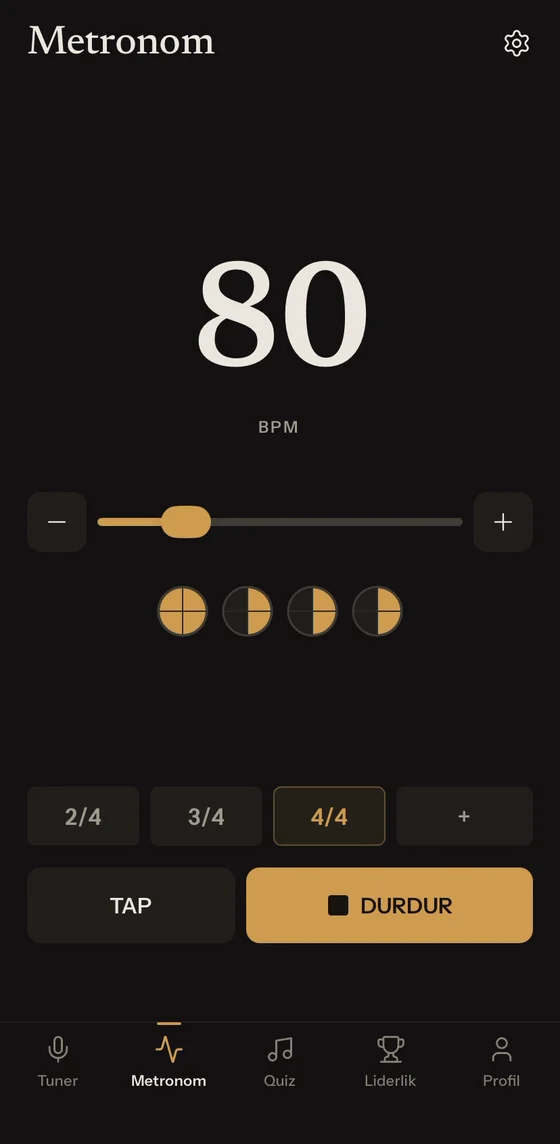
What’s in the metronome?
40–240 BPM
A wide tempo range; it starts at 80 BPM.
Bars
2/4, 3/4 and 4/4 shortcuts; 5/4 to 10/4 under other bars.
Beat accents
Tap the beat circles to change each beat’s accent across four levels.
Tap tempo
Tap the TAP button in rhythm and the tempo is found for you.
Six signal sounds
Different click sounds from Signal 1 to Signal 6.
Haptics
Turn on haptics to feel the beats as vibrations.
Technical details
Your metronome settings (tempo, bar, accents, sound, haptics) are saved in the app.
- Tempo
- 40–240 BPM (default 80)
- Bar
- 2/4, 3/4, 4/4 · 5/4, 6/4, 7/4, 8/4, 9/4, 10/4
- Accent
- 4 levels per beat
- Sound
- Signal 1–6
- Feedback
- Sound and optional haptics
How to use it
Set the tempo
Use the slider or tap TAP to set the tempo.
Pick a bar
Choose a shortcut or another bar; adjust the accents.
Start
Press START and choose the signal sound and haptics you prefer.
Try it in your browser
Try it in your browser
The web demo has tempo, a 2/3/4-beat bar and tap tempo. Sound only plays after you press Start.
These demos are for illustration; they are not the app itself. No microphone is used.
Try three tools without installing.Sound only plays after you press Start.
Common questions
What is the metronome’s tempo range?
40 to 240 BPM. The app starts at 80 BPM.
Which bars are available?
2/4, 3/4 and 4/4 as shortcuts; 5/4, 6/4, 7/4, 8/4, 9/4 and 10/4 under other bars.
Can I accent beats differently?
Yes. Tap the beat circles to change each beat’s accent across four levels.

Download it. Play a set.
Completely free. iPhone, iPad and Android; ages 13 and up.